The EPFO Member Login enables users to have a secured login to their EPF account via the
official Unified Member Portal with their UAN and password. Upon successful login, one can see
his/her PF balance, get their EPF passbook, know about the status of their claim, update their
KYC, make claims online, and manage their provident fund account. In case one faces difficulties
in logging in, for example, wrong password, wrong UAN, or portal problems, this article will
help in logging in to one's account.
Three Schemes, One Registration
EPF + EPS pension + EDLI life cover. You're auto-enrolled in all three.
New 2025 Withdrawal Rules
13 clauses cut to 3 categories. Up to 90% for housing after just 3 years.
6 Crore Members, ₹18 Lakh Crore
One of the largest retirement systems in the world.
Employer Adds 20-30% to Your Corpus
Their 12% match compounds alongside yours for your whole career.
Passbook view, claim settlement, KYC updates, fund transfers
Helpdesk Number
14470 (Toll free)
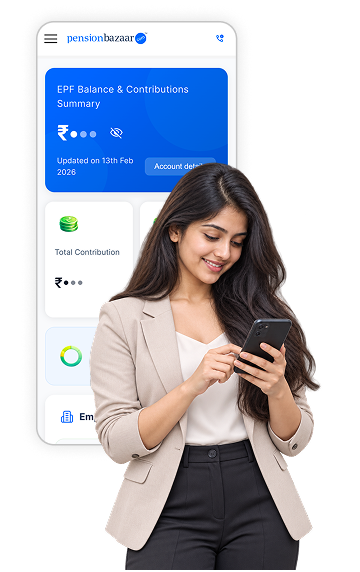
Quick EPF Balance Check Without UAN
While the EPFO member login process requires UAN activation and password authentication, many
employees today prefer a faster alternative.
Through PensionBazaar, you can check your EPF balance in less than two minutes even if you do
not remember your UAN number. The platform eliminates the need for portal navigation, captcha errors, or
password resets.
For users who simply want to know:
Current EPF balance
Contribution history
Projected retirement corpus
The process is significantly simpler and saves time compared to the official portal route.
Operated by the Employees' Provident Fund Organisation, a statutory body established under
the
Employees' Provident Fund and Miscellaneous Provisions Act, 1952, the portal serves as the primary
transactional
interface for EPF members. This guide explains how to perform a secure UAN login, activate your account,
access
services on your EPFO member home dashboard, and use the system efficiently for account management and
compliance.
What Is the EPFO Member Portal
The EPFO portal represents the formal online platform of provident funds. It allows the
employees to have access to EPF information without having to visit their field offices. By executing a PF
member login, subscribers can:
View PF balance
Download EPF passbook
Submit online claims
Update KYC details
File e-nomination
Track claim status
EPFO Core and Digital Infrastructure
EPFO Core refers to the centralised digital framework supporting member data, employer
records, and transaction processing. It provides real-time updates to the accounts of the members.
Under the EPFO Core infrastructure, contribution records, Aadhaar authentication, and
employer filings are integrated into a unified database. This reduces processing delays, minimises manual
intervention, and enables faster claim settlements compared to the earlier paper-based system. This
infrastructure allows:
Faster claim settlements
Unified account access
Secure authentication
Reduced manual intervention
Despite this integration, some members experience delays. If your PF balance not showing, it may be
due to pending ECR filings by your employer.
How to Register on the EPFO Portal
There is mandatory registration before using online services. The ability to do a successful
EPFO login is made possible through UAN
Activation. To use your UAN number and turn it on, follow the steps below:
Visit the EPFO Member Portal.
Click on Activate UAN.
Enter UAN or Member ID details.
Provide Aadhaar, name, date of birth, and mobile number.
Enter the captcha code.
Submit details to receive an authorisation PIN.
Enter the PIN to complete activation.
Prerequisites for a Smooth EPFO Member Login
Before you attempt to access the portal, you must ensure you have the correct administrative
elements in place. Trying to bypass these requirements is the most common reason users face login failures.
A Valid UAN: Your Universal Account Number is a unique 12 digit number assigned by the
EPFO. If you do not know it, you can ask your employer or find it printed on your monthly salary slip.
Registered Mobile Number: The mobile number linked to your Aadhaar card must be active.
The portal relies heavily on OTP (One Time Password) verification for security.
UAN Activation: Having a UAN is not enough. You must digitally perform UAN activation
on the portal to generate your first password.
How to Log in to the EPFO Member Portal for Employees
The Unified Member Portal enables employees to check their EPF accounts. The steps involved
in logging in with EPFO are as follows:
Visit the EPFO Unified Portal
Click on Services and select For Employees
Choose Member UAN Online Services
Enter UAN, password, and captcha
Click Sign In
Enter the six-digit OTP received on the registered mobile number
Submit to complete second-factor authentication
UMANG App Login for EPFO Services
The UMANG (Unified Mobile Application for New-age Governance) app provides a mobile-first
gateway to EPFO
services, turning your smartphone into a pocket-sized PF office.
Steps to log in via UMANG:
Download the UMANG app from Play Store or App Store
Open the app and register using your mobile number
Verify mobile number using OTP
Search for EPFO in the services section
Select Employee Centric Services
Click on View Passbook or Raise Claim
Enter your UAN
Authenticate using OTP sent to your registered mobile number
Key services available on UMANG:
EPF balance check
Passbook download
Claim submission
Claim status tracking
KYC updates
The app eliminates dependency on desktops and allows anytime, anywhere access.
Employer Login on EPFO Portal
Employers use the EPFO Employer Portal to manage employee provident fund contributions and
ensure statutory
compliance.
Steps for employer login:
Visit the EPFO Employer Portal
Click on Establishment Sign In
Enter Establishment ID and password
Complete captcha verification
Access the employer dashboard
Key employer functions:
Upload Electronic Challan cum Return (ECR) files
Verify employee KYC details
Approve claims and requests
Generate TRRN for payments
Track contribution status
Maintain compliance records
This system ensures transparency, reduces errors, and streamlines monthly filings.
How to Get a UAN Number
Employers usually generate and share the UAN at the time of joining. The same UAN remains
valid throughout employment changes. Here are the steps to know UAN online:
Visit the EPFO Member Portal
Click Know Your UAN
Enter the registered mobile number and the captcha
Request OTP
Verify OTP and submit identity details
Click Show My UAN to view the number
EPFO Password Reset Process
It is possible to reset forgotten passwords online without having to go to EPFO offices.
The
following are the steps that are to be taken to reset your EPFO password:
Visit the UAN e-Sewa Portal
Click Forgot Password
Enter UAN and captcha for verification
Enter name, date of birth, and gende
Verify Aadhaar and provide consent
Receive OTP on the registered mobile number
Set a new password and submit
If you are unable to reset your password or your account remains locked, see our guide on EPF
Account Locked? Reasons & How to Unlock
Services Offered on EPFO Portal
The portal provides a comprehensive range of digital services that eliminate the need for
physical visits to EPFO offices. Through a secure login, members can manage contributions, file claims,
update personal details, track requests, and download official records all within a single interface.
These
include:
One Employee One EPF Account
This service allows consolidation of multiple PF accounts under one UAN. Members
can
merge
old accounts without employer involvement. It ensures faster transfers and unified balance
tracking.
EPFO Member Passbook Download
Passbooks are available online using UAN credentials. The EPF passbook records
contributions,
withdrawals, and interest credits. You can access the following things:
View contribution history
Download PDF passbooks
Track employer deposits
Pensioner's Portal
This portal reduces dependency on pension disbursing banks. The EPFO Pensioner
Portal
supports retired members.
Services include:
PPO number lookup
Pension credit status
Jeevan Praman submission
Electronic Challan cum Return Portal
Employers upload monthly contribution data through the ECR portal. Digital
signatures
are
required for submission. The system ensures accurate compliance reporting.
Principal Employer Facility
This service links principal employers with contract employers. It expands EPF
coverage to
outsourced workers and contract staff.
TRRN Query Service
The Temporary Return Reference Number allows tracking of PF challan payments.
Members can:
Check payment status
Download challan receipts
Access records without login
EPFO Helpdesk Support
EPFO operates a centralised helpdesk for UAN-related issues. Members can contact:
1800 118
005
Certificate of Coverage for International Workers
EPFO offers a Certificate of coverage to international workers.
India has entered into social security agreements with various nations, among them Germany,
France,
Canada, and Japan.
Applications are allowed online by eligible workers through identity documents.
How to File EPFO e-Nomination Online
The e-Nomination allows members to assign beneficiaries digitally. You can complete the
process under the Manage section after logging in. Below are some key features:
Multiple nominees allowed
Percentage allocation supported
No employer approval required
Unlimited modifications permitted
e-KYC Update on EPFO Portal
The e-KYC ensures faster claims and accurate records. Here are the steps you can follow
to
update your e-KYC
Log in to the UAN Member Portal.
Click Manage and select KYC.
Enter Aadhaar, PAN, bank, or passport details.
Save information under Pending KYC.
EPFO verifies details with the respective departments.
How to Change Registered Mobile Number
Mobile number updates require Aadhaar-based verification. Here are the steps to update
your
mobile number:
The EPFO portal allows members to submit withdrawal, settlement, and pension claims
digitally
without visiting EPFO offices. Online filing speeds up processing and reduces paperwork through
Aadhaar-based verification. Before filing, check the EPF withdrawal rules for 2026 to
confirm your eligibility, and be aware of the common reasons EPF claims get rejected.
The EPFO Member e-Sewa Portal makes the management of provident funds easy for both the
employee and the employer. Secure login, online services and increased speed of services minimise the
reliance on offices. Provisions under the EPFO Core infrastructure and mobile platforms such as UMANG
have
made the services of provident funds transparent, accessible and fully transactional.
FAQs
Q. Can I access my EPF account if I have forgotten my UAN?
Yes. Click Know Your UAN on the EPFO Member Portal, enter your registered
mobile number, and verify with OTP. Your UAN will be displayed instantly. It is also printed on
most salary slips and can be provided by your HR department.
Q. My UAN is activated but I still cannot log in. What are the possible reasons?
The most common reasons are pending KYC verification, employer not having
approved your UAN, or a temporary account lock. Confirm with your employer that your UAN is
active and that your Aadhaar, PAN, and bank account KYC have been approved on the portal.
Q. How do I check if my employer is depositing my PF contributions every
month?
Log in and go to View Passbook. Each row shows monthly employee and employer
contributions. If any month shows zero employer deposit, your employer has not filed the ECR for
that period. You can raise a complaint through the EPFO Grievance Portal
Q. How long does EPFO take to process an online claim after submission?
Aadhaar-verified online claims are typically processed within 3 to 7 working
days. Claims with KYC discrepancies or pending employer verification can take up to 20 days.
Track your claim status in real time under View > Claim Status after logging in.
Q. Can I use the EPFO portal after leaving a job, or does my account get
deactivated?
Your UAN and login remain active permanently, even after leaving a job. You can
check your balance, download your passbook, and file withdrawal claims at any time. The account
is marked inoperative after 36 months of no contributions but remains fully accessible.






 17 Sep 2026