Quickly Check Your EPF Balance Through PensionBazaar
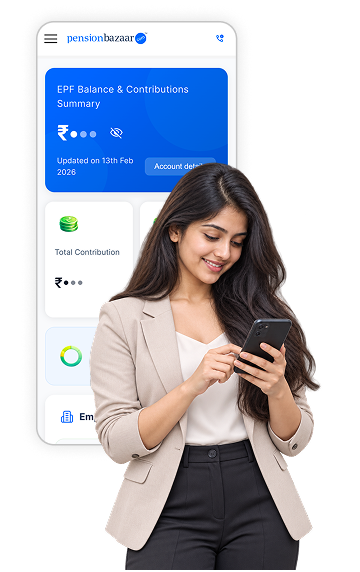
Beyond the four official EPFO channels, PensionBazaar offers its own way to pull up your EPFO
balance and
contribution history without navigating the government portal.
-
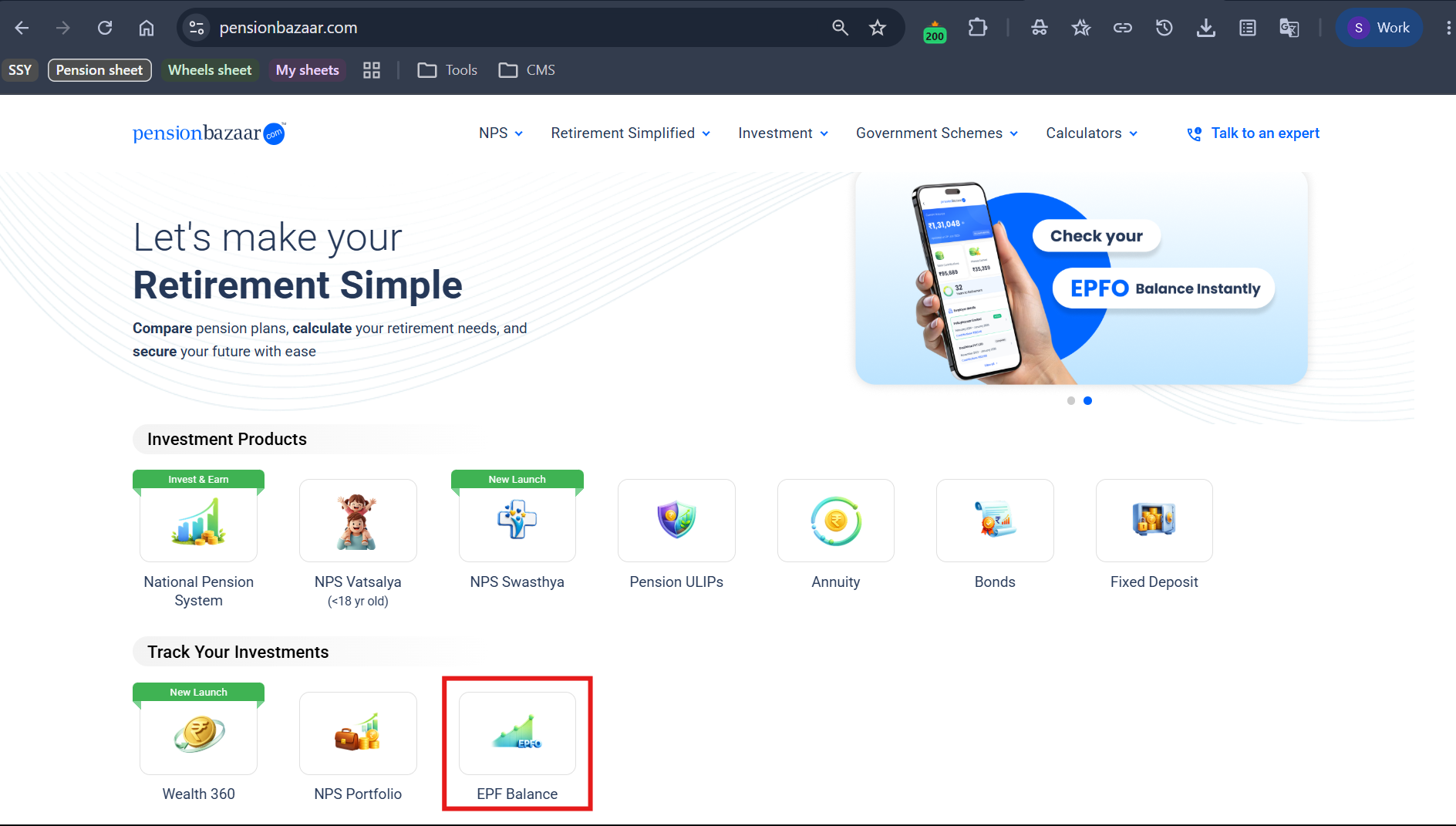
Go to pensionbazaar.com and click on "EPF Balance" under
the "Track Your Investments" section
-
Enter your registered mobile number
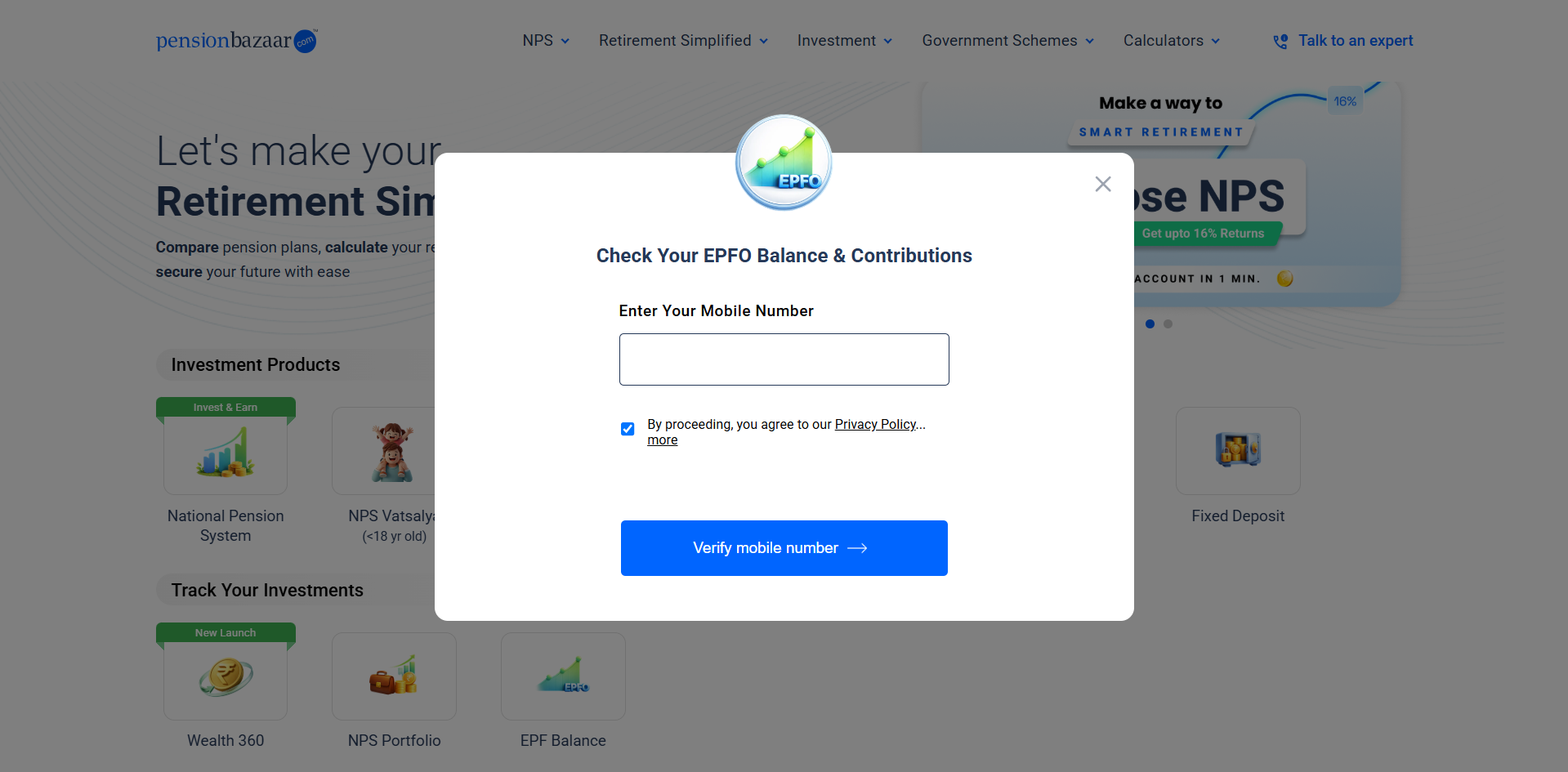
- Verify with the OTP sent to your mobile number
- Enter your PAN
- View your EPF balance and contribution details on the platform
This route is useful if you would rather see your EPF balance alongside your NPS and other
retirement savings
in one
place, rather than opening EPFO, UMANG and your bank app separately. It draws on the same underlying EPFO
data as
the official channels above. The balance shown should match what the portal or passbook shows, once your PAN
and
mobile number are correctly linked to your UAN.
How to Check EPF Balance Online & Offline
EPF balance can be checked through several official channels, including the EPFO Member
Portal, UMANG
app, SMS and
missed call services.
Beyond the four official EPFO channels below, PensionBazaar's own EPFO balance checker
retrieves your
balance and
contribution details after you enter your mobile number and PAN and verify with an OTP.
-
How to Check EPF Balance Through the EPFO Member Portal
TheEPF passbook on
EPFO's own
Member
Portal gives the
most complete view, including every employer you have worked under.
- Visit the official EPFO website and go to Services, then For Employees
- Select Member Passbook
- Log in using your UAN and password
- Enter the captcha and click login
- Select the relevant Member ID to view that employer's passbook
Once logged in, the passbook for each Member ID can be downloaded as a PDF directly
from the
portal. This
gives you a
saved record of contributions and interest credited for that period, useful when comparing figures
across months or
sharing with an employer's HR team.
-
How to Check EPF Balance Through the UMANG App
UMANG is the government's unified app for accessing EPFO and other public services
from a
single place,
and it
mirrors most of what the portal offers in a mobile-friendly format.
- Download the UMANG app from the Google Play Store or Apple App Store
- Register using your mobile number
- Search for EPFO within the app's services
- Select Employee Centric Services
- Click View Passbook
- Enter your UAN and verify with the OTP sent to your registered mobile
- View your EPF balance and passbook details
-
How to Check EPF Balance by SMS
Sending a text message works even without a data connection, provided your UAN is
already
active and
linked to your
mobile number.
Send EPFOHO UAN ENG to 7738299899 from your
registered
mobile number. A
reply with
your latest EPF balance arrives within seconds. The service also supports several regional
languages,
useful if
English is not your preference.
| Language |
SMS Text to 7738299899 |
| English (default) |
EPFOHO UAN |
| Hindi |
EPFOHO UAN HIN |
| Bengali |
EPFOHO UAN BEN |
| Tamil |
EPFOHO UAN TAM |
| Telugu |
EPFOHO UAN TEL |
| Gujarati |
EPFOHO UAN GUJ |
| Kannada |
EPFOHO UAN KAN |
| Malayalam |
EPFOHO UAN MAL |
| Marathi |
EPFOHO UAN MAR |
| Punjabi |
EPFOHO UAN PUN |
Language support follows current EPFO guidance and can change, so confirm the exact
code with
EPFO if
a message does
not go through.
-
How to Check EPF Balance by Missed Call
This is the quickest of the four methods and needs no internet, no login and no typed
message
beyond
the call itself.
- Confirm your UAN is active and linked to your registered mobile number
- Dial 9966044425 from that registered mobile number
- The call disconnects automatically after ringing, so there is nothing to pick up or pay for
- An SMS arrives shortly after with your EPF balance, current balance, and your last contribution
amount and date
Checking Your EPF Balance? Check Your NPS Balance Too
If you have an NPS account, see your current balance via PensionBazaar and keep track of your retirement savings.
Which Method Should You Use
The right method depends on what you have on hand at that moment, so here is a quick way to
decide.
| Your Situation |
Best Method |
| You have internet and want the full passbook, all employers |
EPFO Member Portal |
| You already use UMANG for other government services |
UMANG App |
| You have no internet but remember your language preference |
SMS |
| You want the fastest possible offline route |
Missed call |
| You want your EPF balance alongside NPS and other savings in one view |
PensionBazaar |
| You do not know your UAN |
See special cases below |
What You Need Before Checking Your EPF Balance
A few prerequisites determine whether any of the five methods above will actually work.
- An active UAN, the 12-digit number issued once and used across every employer
- Your UAN linked to your current registered mobile number
- KYC details, PAN, Aadhaar and bank account, updated on the EPFO portal
- Your UAN portal password, needed only for the portal and UMANG routes
- If your UAN is not active, activate it through the UMANG app using Aadhaar-based Face
Authentication before
checking your balance.
Checking Balance in Special Cases
The four methods above assume a working UAN linked to an active mobile number. Here is
what to do
when that is not
your situation.
-
Without a UAN
Every method above depends on having an active UAN. If you do not know yours, or it
has
never
been activated, start
by working out your UAN from your salary slip or by asking your employer. Then activate your UAN through the
UMANG app using
Aadhaar-based Face Authentication.
-
Without a Registered Mobile Number
SMS and missed call both require a linked mobile number, but the EPFO Member Portal
still
works
with just your UAN
and password. If your number has changed, you can update your
mobile number in EPFO
records through the portal once you are logged in.
-
Exempted Establishments and Private PF Trusts
Some large employers run their own PF trust instead of routing contributions through
EPFO
directly. If your employer
falls into this category, your balance will not appear on the EPFO portal at all, and you will
need to check your
salary slip, your employer's own HR portal, or ask HR directly for your balance.
-
Old Employer or Inoperative Accounts
The Member Passbook lists every Member ID you have ever held, so an account from a
previous
employer should still
appear there even if it has gone inactive. If it does not, or if the account has been marked
inoperative, see our
guide to reactivating
an
inoperative
EPF account for the next steps.
Understanding Your EPF Passbook
Knowing how to read the passbook matters as much as knowing how to open it, since the
numbers on
it answer most of
the questions a balance check is actually meant to settle.
| Column |
What It Shows |
| Employee share |
Your own monthly EPF contribution, 12% of basic wages plus dearness allowance
|
| Employer share |
Your employer's EPF contribution, the balance of their 12% after the EPS portion
is set aside |
| Pension, EPS column |
The portion of the employer's contribution routed to the Employees' Pension
Scheme, currently 8.33%
of wages up to the applicable ceiling |
| Interest credits |
Interest declared by EPFO for the year, credited to the account, 8.25% for FY
2025-26 |
| Opening and closing balance |
The balance carried forward at the start and end of each financial year |
Each time you check your balance, it is worth glancing at three things on the
passbook.
- Has your employer's contribution for the most recent month actually landed?
- Has interest for the year been credited?
- Do the employee and employer figures broadly match what your salary slip shows?
- The EPS, or pension, column is often the most confusing line on the passbook.
For eligible employees covered by the revised ceiling, the maximum wage considered
for the
applicable EPS
contribution can increase from ₹15,000 to ₹25,000. It does not mean every member's eventual
pension rises by the
same proportion, since the final pension amount also depends on pensionable salary and years
of service under EPFO's
pension formula. Treat any specific pension projection with caution until EPFO issues
member-level clarity.
EPF Balance Not Updating, Common Problems and Fixes
If the EPF balance appears unchanged or does not reflect the latest contribution, the
issue
usually falls into one of
four categories:
- Delay in the latest contribution: The employer may not have deposited
or updated the most
recent month's contribution yet. Delays can occur before the latest contribution appears
in the EPF balance.
- Annual interest is yet to be credited: EPFO credits interest for a
financial year through a
batch process rather than updating it continuously. Therefore, a delay in the annual
interest entry does not
necessarily indicate an error. Learn more about EPF interest not
being credited and
the checks that can be made in such cases.
- Mobile number, KYC or UMANG-related issues: Incorrect or mismatched
details can prevent access
through SMS, missed calls or UMANG, even when the EPF balance itself is unaffected.
Problems with EPFO
login or UAN-Aadhaar
linking can also affect
access to EPF services.
- Issue remains unresolved: If the balance does not update after these
checks, an EPFO
grievance can be lodged through the
EPFiGMS portal for further resolution.
Conclusion
Checking your EPF balance is a one-minute task once your UAN is active, whether you
use the
EPFO portal, UMANG, SMS,
a missed call or PensionBazaar's own mobile-and-PAN lookup. The number itself, though, is
only a snapshot. Speak
with a PensionBazaar retirement planning expert
to see how your EPF
corpus fits into your broader retirement plan alongside NPS and any other savings you are
building toward the same
goal.







 05 Oct 2026