Online and Offline Methods for NPS Account Opening
You can register for NPS through aggregators, Central Recordkeeping Agency (CRA) portals,
banks, post offices, Pension Fund Managers (PFMs) or your employer. The table below compares every method to
open an NPS account:
| Registration Route |
Mode |
Typical Processing Time |
KYC Mode |
PoP Onboarding Fee |
| PensionBazaar |
Online |
Instant |
Aadhaar OTP |
₹0 (No onboarding charges) |
| CRA Portals (Protean, KFintech, CAMS) |
Online |
Instant PRAN generation |
Aadhaar e-KYC, DigiLocker, CKYC, or Bank KYC |
₹0 (Direct eNPS) |
| Bank Net Banking / Mobile App |
Online |
Instant to 2 working days |
Existing Bank KYC / Aadhaar OTP |
Up to ₹200 + GST |
| Pension Fund Manager (PFM) Website |
Online |
Instant to 2 working days |
Aadhaar e-KYC, DigiLocker, or CKYC |
₹0 (Direct eNPS route) or PoP fee |
| CRA Mobile Apps |
Online |
Instant PRAN generation |
Aadhaar e-KYC or DigiLocker |
₹0 (Direct eNPS) |
| Authorised Bank Branch (PoP-SP) |
Offline |
3 to 7 working days |
Physical self-attested KYC |
Up to ₹200 + GST |
| Post Office (India Post PoP-SP) |
Offline |
5 to 10 working days |
Physical self-attested KYC |
Up to ₹200 + GST |
| PFM Office / Non-Bank PoP |
Offline |
3 to 7 working days |
Physical self-attested KYC |
Up to ₹200 + GST |
| Employer HR (Corporate NPS) |
Online / Offline |
3 to 10 working days |
Employer verification + KYC |
Negotiated corporate rate |
| Government Nodal Office |
Offline / Online |
7 to 15 working days |
DDO / PAO verification |
₹0 (Borne by Government) |
Who Can Open an NPS Account?
Any individual who meets the required KYC guidelines issued by PFRDA is eligible to open an
NPS account:
- Age Limit: Resident Indians, Non-Resident Indians (NRIs), and Overseas
Citizens of
India (OCIs) aged 18 to 85 years can join NPS under the All Citizen Model.
- Account Structure (Tier I vs Tier II): Every new subscriber must open an NPS Tier I account, which is the main
retirement pension account. Resident Indian subscribers who already have a Tier I account can also open
a Tier II account for flexible liquid savings.
- NRIs, OCIs, and Minors: NRIs, OCIs and Minors: NRIs and OCIs can open a Tier I NPS
account (Tier II is not allowed for non-residents). Parents or guardians can open a retirement account
for children under 18 through NPS
Vatsalya.
What Documents Are Required for NPS Registration?
The documents required for subscriber verification during NPS account opening depends on
whether you choose an online route or offline route:
-
Online NPS Registration
Online NPS portals support multiple paperless KYC pathways, so you do not have to
mail physical forms:
- Aadhaar OTP e-KYC: Instant authentication using a one-time password sent to the
mobile number linked with your Aadhaar.
- Aadhaar Offline e-KYC: Uploading a password-protected Aadhaar XML file
downloaded from the UIDAI website.
- DigiLocker KYC: Fetching your verified Aadhaar or Driving Licence records
directly from your DigiLocker account.
- Central KYC Registry (CKYC): Pulling your existing KYC record automatically
using your PAN and date of birth if you are already CKYC-registered.
- Bank Account KYC: Verification through an empanelled bank where your existing
savings account KYC is already completed.
- Video KYC (v-KYC): Live video verification offered by select intermediaries for
remote onboarding, especially useful for NRI and OCI applicants.
-
Documents Required for Offline NPS Registration
If you prefer going the offline route for NPS account opening, make sure to keep the
following documents handy:
- Completed Registration Form: Common Subscriber Registration Form (CSRF) for All
Citizen / Corporate subscribers, or Form S1 / Form A1 for Government employees.
- Identity Proof: Self-attested copy of your PAN card (mandatory for tax
tracking), Aadhaar card, Passport, Voter ID, or Driving Licence.
- Address Proof: Self-attested copy of Aadhaar card, Passport, Voter ID, Ration
Card, bank passbook with photograph, or a recent utility bill (not older than three months).
- Bank Account Proof: A cancelled cheque leaf with your pre-printed name or a
self-attested copy of your bank passbook or statement showing your account number and IFSC.
- Photographs and Signature: Two recent colour passport-sized photographs and
your physical signature on the application form.
- Additional Documents for NRIs and OCIs: Copy of valid Passport (and OCI card
for OCIs), overseas address proof, and NRE or NRO bank account proof.
How to Open an NPS Account Online?
Digital onboarding is the most convenient way to register for the National Pension System.
The following are the ways to open an NPS account online:
-
NPS Account Opening via PensionBazaar
PensionBazaar makes the NPS account opening process easier by allowing you to compare
Pension Fund Managers and immediately generate your 12-digit PRAN. Follow these steps to open your
NPS account through PensionBazaar:
-
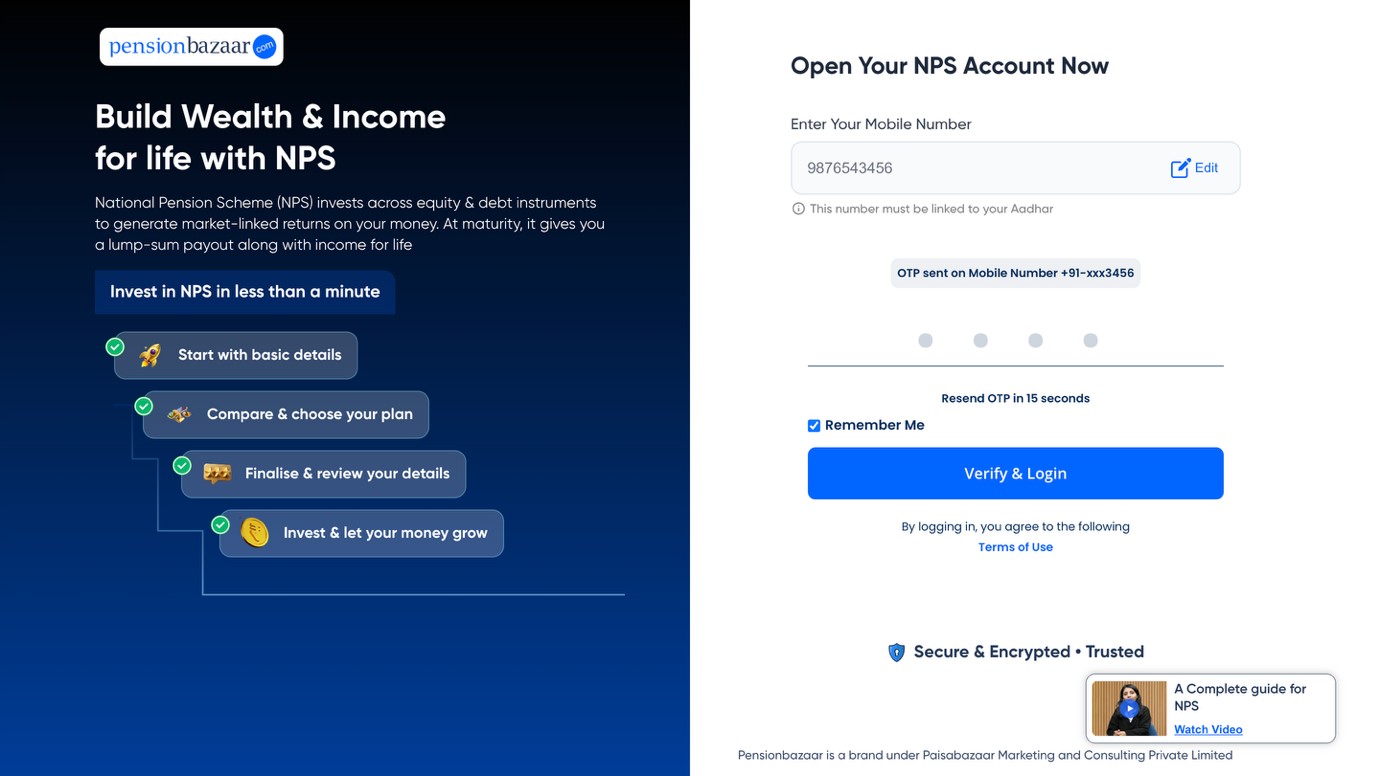
Start online: Open the National Pension System page on PensionBazaar, enter
your basic details and verify your mobile number with an OTP.

-
Choose your plan: Pick the risk level and contribution amount that suits your
age and comfort with market linked returns.

-
Review your selection: Before proceeding, review your chosen plan and
contribution details to ensure everything is correct.

-
Select Invest Now: Select Invest Now. You will be redirected to complete your
KYC and personal details.
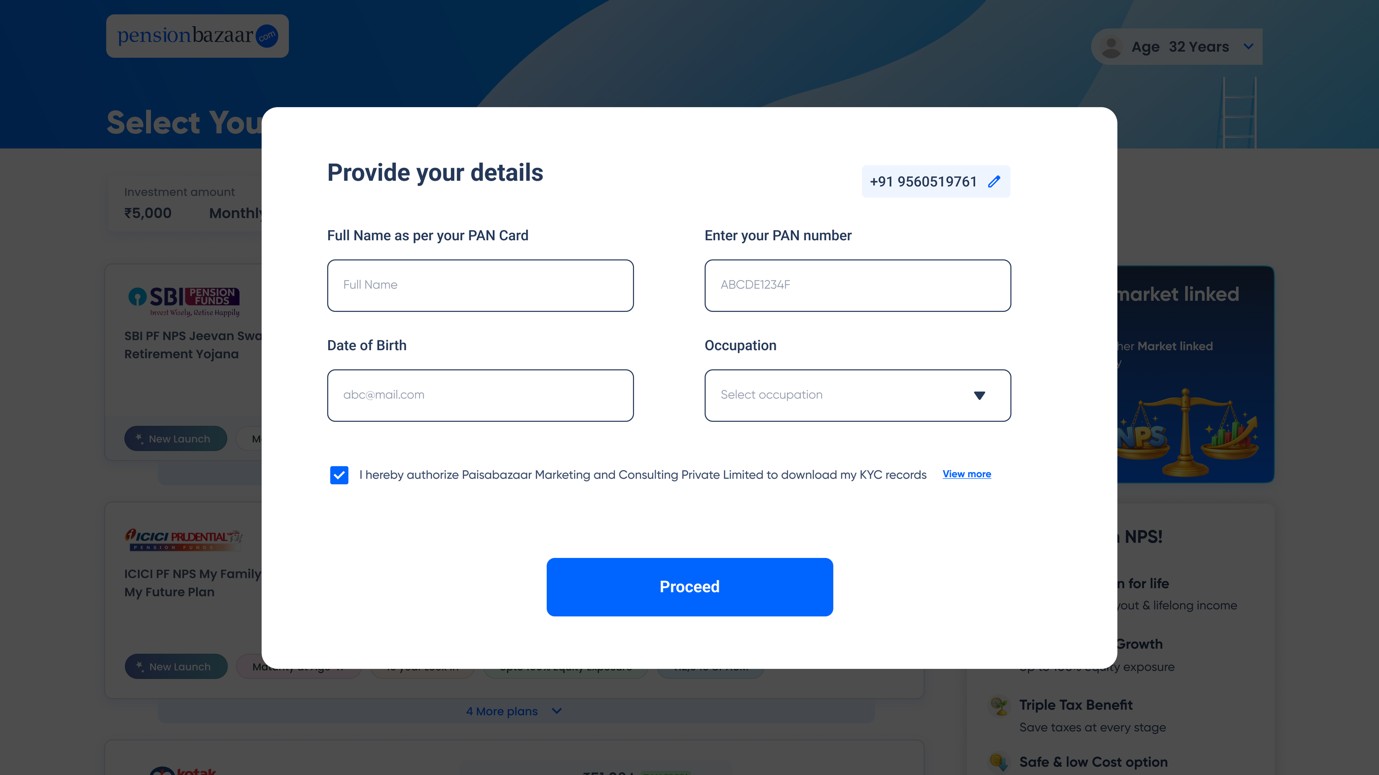
- Complete the Verification Process: PensionBazaar checks your PAN against
existing NPS records. If an account already exists, you can link that PRAN instead of opening a
duplicate.
-
Authenticate with an OTP: Your consent and the mandatory declarations are
captured at the end of the journey through the OTP, which completes the paperless application.

Open Portfolio View after buying: Once your purchase is complete, go to Portfolio
View to see your NPS investment and track it from one place.
Keep your PAN, your Aadhaar linked mobile number and your bank account details ready
before you begin.
-
NPS Account Opening on CRA Portal
The PFRDA authorises Protean, KFintech and CAMS as the three Central Recordkeeping
Agencies that run direct eNPS portals. Here is how to open an NPS account via a CRA portal:
- Visit the official eNPS portal of the CRA you prefer, such as Protean, KFintech or CAMS.
- Select New Registration and choose your applicant category (Individual Subscriber, NRI/OCI, or
NPS Vatsalya).
- Select your preferred KYC mode (Aadhaar e-KYC, DigiLocker, CKYC, or Bank KYC) and verify your
OTP.
- Enter your personal information, bank information and nominee details, then upload a scanned
copy of your photograph and your signature.
- Select your Pension Fund Manager and investment option, pay
the initial contribution online, and
complete e-Sign to receive your e-PRAN.
-
NPS Registration Through Net Banking or Mobile Banking App
If you have an active bank account with a major PoP bank, you can open an NPS account
directly inside the online banking portal.
- Log in to your bank's Net Banking portal or mobile banking app.
- Navigate to the Investments, Social Security Schemes, or NPS section.
- Click Open NPS Account and allow the bank to pre-fill your personal and address details from
your bank KYC records.
- Select your Tier preference, Pension Fund Manager, investment choice, and nominee details.
- Authorise the initial contribution from your linked savings account to complete registration.
-
NPS Registration Through PFM Websites
You can also register for NPS through several Pension Fund Managers'
websites.
A few PFMs, such as HDFC Pension, SBI Pension Funds, UTI Pension Fund, ICICI Prudential Pension
Funds, Kotak Mahindra Pension Fund, Aditya Birla Sun Life Pension Management, Tata Pension
Management, and Axis Pension Fund, offer online NPS registration links on their websites.
When you click on the Open NPS Account link, the PFM either guides you to their own
NPS onboarding journey or redirects you to an integrated CRA eNPS portal.
How to Open an NPS Account Offline?
If you require face to face assistance or do not have an Aadhaar-linked mobile number, you
can open NPS account offline through the following mediums:
-
NPS Account Opening at a Bank Branch
You can open an NPS account at a bank branch by following the listed steps:
- Visit your nearest NPS-enabled bank branch and ask for the NPS Common Subscriber Registration
Form.
- Fill in the form using black ink and block letters, specifying your personal details, nominee,
Pension Fund Manager, and asset allocation.
- Attach self-attested copies of your PAN card, identity proof, address proof, cancelled cheque,
and passport-sized photographs.
- Submit the form along with your initial contribution via cheque, demand draft, or account debit
slip.
- Collect the acknowledgement receipt. The bank will send your PRAN kit by post and email once
your KYC is verified.
-
NPS Registration at a Post Office
Indian Post functions as an authorised PoP across thousands of Head Post Offices and
Sub-Post Offices in the country. You can visit an NPS-enabled post office to open an NPS account
offline. Collect the NPS registration form, submit your KYC verification documents and make your
initial contribution. You will receive an acknowledgement receipt while your PRAN is
processed.
-
Corporate NPS Registration
If your employer offers Corporate NPS as an employee
benefit, you can register for the National Pension System through your Human Resources or payroll
team:
- Obtain the Corporate NPS registration form or internal HR onboarding link from your employer.
- Provide your PAN, Aadhaar, bank details, and nominee information, and select your preferred
Pension Fund Manager and investment option.
- Submit the form to your HR department, which verifies your employment details and forwards the
application to the corporate PoP or CRA.
- If you already hold an individual All Citizen PRAN, you can shift it to Corporate NPS without
opening a new account.
-
NPS Registration Through Government Nodal Office
If you're a Central or State Government employee, you can get your NPS account
opened through a Government Nodal office.
- Obtain and Complete the Form: Acquire and fill out the Contribution Subscriber
Registration Form (or Form CSRF-1 for state government employees), along with the required
identity and address documents.
- Submit to your Office: Hand over the completed form to your Drawing and
Disbursing Officer.
- Authorisation and Forwarding: The Drawing and Disbursing Officer authorises the
form and forwards it to the Pay and Accounts Office, Cheque Drawing and Disbursing Officer,
District Treasury Office, or Directorate of Treasuries and Accounts. This office then submits it
to the Central Recordkeeping Agency to generate your Permanent Retirement Account Number.
Common Mistakes to Avoid While NPS Account Opening
If you are opening an NPS account, make sure that you avoid these common errors as they often
delay or block NPS account registration:
- PAN and Aadhaar Information Mismatch: Your full name, father's name, and date of birth
must match across your PAN card, Aadhaar card, and bank account. Even minor spelling differences can
cause e-KYC or CKYC rejection.
- Unlinked or Inactive Mobile Number: Online Aadhaar e-KYC and e-Sign require an OTP sent
to the mobile number registered with UIDAI. Update your mobile number with Aadhaar before starting
online registration.
- Attempting to Open a Duplicate PRAN: Under PFRDA rules, an individual can hold only one
PRAN per CRA (and at most three PRANs across Protean, KFintech, and CAMS combined). Trying to open a
second account under the same PAN and CRA will result in rejection.
- Incorrect Scanned File Format or Size: During eNPS registration, ensure your photograph
and black-ink signature on white paper are saved in jpg or jpeg format and meet the portal's exact file
size limits.
- Skipping Nominee Registration: Leaving the nominee section incomplete can create legal
delays for your family later. Always register at least one nominee during onboarding.
Key Takeaway on Opening an NPS Account in 2026
Opening an NPS account in 2026 is a simple process with a number of various onboarding
channels available. You can choose instant digital onboarding through PensionBazaar or eNPS, or visit
offline registration places like bank branches and post offices. By keeping your PAN, Aadhaar, and bank
details aligned, you can generate your PRAN in minutes and start building a low-cost, tax-efficient
retirement fund. Choose the registration channel that best matches your comfort level, set up automated
monthly contributions, and stay invested for long-term financial security.




 01 Oct 2026